
Select one of the options below.
-
Temporarily suspend access to my medical data but keep account for online bookings
-
Remove access to my medical record but keep my account for online bookings
- Deactivate and delete my Vensa account
Temporarily suspend access to my medical data
If you have a verified Vensa account linked to your medical centre and would like to temporarily restrict access to your health record, you can manage this directly in your portal settings. Your account will stay active to allow you to continue booking appointments online.
How to update your settings:
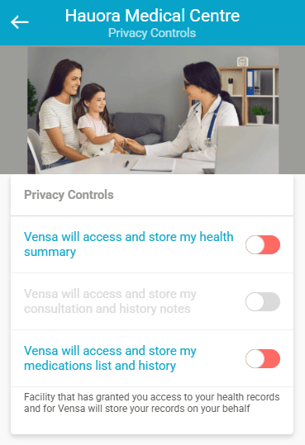
1. Go to Settings > Privacy
2. Select your medical centre
3. Adjust the privacy options as needed
What the toggle colours mean:
Green (on): You are allowing access to this part of your medical record, and it can be securely displayed in your Vensa account
Red or grey (off): You are not allowing access to this part of your medical record
You can change these settings at any time.
Remove access to my medical record but keep my account for online bookings
If you have a verified Vensa account linked to your medical centre and would like to remove this access but keep the account for online bookings, you can ask your practice to remove your Vensa verification.
This will remove online access to your medical record and the ability to order repeat prescriptions online. Your basic Vensa account will remain active, allowing you to continue booking appointments online when needed.
Deactivate and delete my Vensa account
If you would like to permanently close your Vensa account and have any associated medical data removed in accordance with privacy and legal requirements, please email patients@vensa.com.
For security reasons, the email must be sent from the same email address used to register your Vensa account. Once processed, you will receive an email confirming that your account has been closed.
Please note: You can still book appointments online without an active Vensa account. During booking, you will be asked to provide your name, date of birth, and mobile number.
Read more about portal security here.